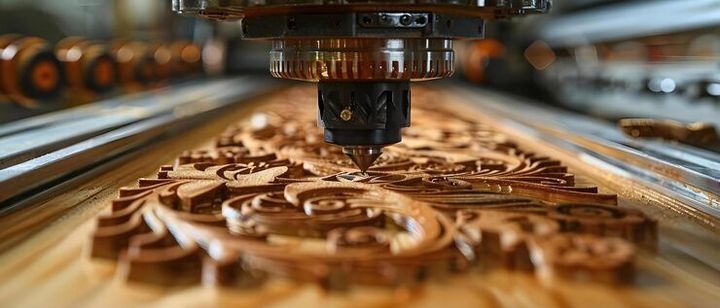
CNC Wood Routers Explained: Types, Components, Working Principles, Applications and Benefits
A CNC wood router is a computer-controlled cutting machine used to shape, carve, engrave, drill, and profile wood-based materials. CNC stands for Computer Numerical Control, meaning that programmed instructions guide the movement of the cutting tool along different axes. CNC wood routers are used in furniture production, cabinetry, sign making, interior components, decorative panels, and many other woodworking activities.
Traditional woodworking routers depend largely on manual movement and operator control. CNC wood routers combine a router spindle, cutting tool, mechanical movement system, control software, and a worktable. This arrangement allows a digital design to be translated into controlled tool movements.
The development of CNC technology brought computer-based control into woodworking and manufacturing. Earlier numerical-control systems were associated with industrial machining, while later computer-controlled systems became more accessible for smaller workshops and specialized woodworking applications.
Today, CNC wood routers range from compact machines for small workshops to large-format systems used for sheet materials and repeated production. Their capabilities depend on machine dimensions, spindle specifications, software, tooling, material characteristics, and operating settings.
Importance
CNC wood routers matter because woodworking often involves repeated shapes, detailed patterns, accurate holes, curved profiles, and complex designs. A computer-controlled machine can follow programmed toolpaths consistently, while the operator supervises material setup, tooling, programming, cutting conditions, and machine operation.
These machines are relevant to furniture makers, cabinet manufacturers, interior contractors, educational workshops, hobby users, and manufacturing facilities. They can work with materials such as solid wood, plywood, MDF, particleboard, laminates, and certain plastic-based sheets when appropriate tooling and operating parameters are used.
Common problems addressed
Manual cutting can require considerable time when the same design must be reproduced several times. CNC systems can store digital designs and repeat programmed movements, which can help maintain consistency between similar pieces.
Another issue is complex geometry. Curves, pockets, grooves, lettering, decorative patterns, and three-dimensional shapes can be programmed through CAD and CAM software. The machine then converts these instructions into movements along its working axes.
A CNC wood router can also help organize several operations within one digital workflow. Depending on the machine and software, a design may include cutting, drilling, engraving, and pocketing operations.
Main advantages
The practical characteristics of CNC wood routers include:
- Computer-controlled movement across multiple axes.
- Repeatable machining of programmed shapes.
- Compatibility with CAD and CAM workflows.
- Ability to perform cutting, engraving, profiling, and pocketing.
- Digital storage of designs and toolpaths.
- Support for different worktable sizes and machine configurations.
- Reduced dependence on manual movement during cutting operations.
These characteristics do not remove the need for human supervision. Correct material placement, tool selection, machine setup, dust control, programming, and safety procedures remain important.
Types of CNC Wood Routers
CNC wood routers can be grouped according to their construction, working area, number of axes, and intended application.
3-axis CNC wood router
A 3-axis router normally moves along the X, Y, and Z axes. X and Y control movement across the work surface, while Z controls vertical movement of the cutting tool.
This configuration is widely associated with flat-sheet cutting, engraving, profiling, drilling, and two-dimensional or relatively simple three-dimensional woodworking operations.
4-axis CNC router
A 4-axis machine adds another rotational or movement capability to the conventional three-axis arrangement. The additional axis can allow machining around certain surfaces or components that are difficult to process using only three linear axes.
Its usefulness depends on the machine configuration and the type of work being performed.
5-axis CNC router
A 5-axis CNC router provides additional movement through rotary or tilting axes. This allows the cutting tool to approach a workpiece from several directions.
Five-axis systems are used for more complex shapes, curved components, molds, sculptures, and specialized woodworking applications. Programming is also more complex because the software must account for multiple simultaneous movements.
Gantry and compact routers
Large gantry-style CNC routers provide a broad working area and are commonly associated with sheet processing. Compact desktop or benchtop routers occupy less space and are suited to smaller workpieces and educational or workshop environments.
The appropriate configuration depends on the material dimensions, design complexity, production requirements, available workspace, and desired machining operations.
Components and Working Principles
A CNC wood router consists of several connected systems that work together to transform digital instructions into physical tool movement.
Main components
| Component | Main function |
|---|---|
| Controller | Interprets programmed machining instructions |
| Spindle | Rotates the cutting tool |
| Cutting tool | Removes material from the workpiece |
| Drive system | Moves the machine along its axes |
| Worktable | Supports and positions the material |
| Vacuum or clamping system | Helps hold the workpiece in position |
| CAD/CAM software | Creates designs and generates toolpaths |
| Dust collection system | Collects chips and airborne dust |
| Limit or position sensors | Help monitor machine movement |
The spindle is one of the central components. It rotates the cutting tool at a selected speed, while motors and drive mechanisms move the spindle or worktable according to programmed coordinates.
How CNC wood routers work
The process generally begins with a digital drawing created in CAD software. The design is then prepared in CAM software, where the user defines cutting paths, tool selection, cutting depth, speeds, and other machining parameters.
The CAM program generates machine instructions, commonly known as G-code or another compatible numerical-control format. The controller interprets those instructions and directs the machine's movement.
The workpiece is positioned on the table and secured using suitable clamps, vacuum holding, or another appropriate method. After the machine is prepared, the router follows the programmed path while the cutting tool removes material.
The final result depends on several factors, including tool geometry, material type, spindle speed, feed rate, cutting depth, workholding, machine rigidity, and programming accuracy.
Applications of CNC Wood Routers
CNC wood routers are used across several woodworking and manufacturing activities.
Furniture and cabinetry
Furniture components can include panels, shelves, cabinet parts, decorative surfaces, and shaped components. CNC machining can create repeated holes, slots, profiles, and cutouts from digital drawings.
Sign making and engraving
Wooden signs, lettering, logos, decorative patterns, and engraved panels can be produced using suitable router bits and programmed toolpaths.
Interior components
Interior applications may include wall panels, partitions, decorative screens, doors, architectural features, and custom-shaped wooden elements.
Prototyping and education
CNC routers are also used in technical education, design laboratories, maker spaces, and prototype development. Students and designers can use them to understand CAD/CAM workflows, digital fabrication, toolpaths, and material behavior.
Model making
Small-scale architectural models, product prototypes, relief carvings, and artistic pieces can be produced with appropriate machines and tooling.
Recent Updates and Current Trends
From 2024 through 2026, CNC woodworking has continued to move toward greater digital integration. Current systems increasingly connect design software, toolpath generation, machine controls, workholding, and production monitoring within connected workflows.
Automation is another notable trend. Features such as automatic tool changing, vacuum workholding, probing, nesting software, and machine monitoring can reduce the number of manual setup steps involved in suitable applications.
Nesting has also become important for sheet-based woodworking. Nesting software arranges multiple components within a sheet to create a programmed cutting pattern while accounting for tool diameter, spacing, material dimensions, and cutting paths.
Another development is the increasing use of digital manufacturing workflows. CAD models can move into CAM environments, where machining operations are prepared before being transferred to CNC equipment. This digital approach connects design and physical fabrication more closely.
Dust management and workplace safety remain important areas of attention. Modern woodworking environments may combine enclosed cutting areas, extraction systems, machine guarding, emergency controls, and operator training as part of the overall machine setup.
Laws or Policies
For readers in India, CNC wood router operation can fall within workplace safety and occupational health requirements depending on the establishment, workforce, and applicable rules. The Occupational Safety, Health and Working Conditions Code, 2020 provides a broader legal framework concerning occupational safety, health, and working conditions. India Code records the Code's enforcement from November 2025.
The framework includes provisions concerning machinery safeguarding, workplace conditions, ventilation, material handling, and other safety matters. Specific requirements can depend on the type of establishment and applicable central or state rules.
Indian model rules relating to woodworking machinery have also described measures such as effective stopping and starting controls, clear space around operating machines, suitable floor conditions, and adequate training or supervision for people working with woodworking machinery.
Because requirements can vary according to the workplace and jurisdiction, machine operators and facility managers should consult the applicable central and state regulations rather than relying on general descriptions alone.
Tools and Resources
Several digital tools can support a CNC wood router workflow. CAD software is used to create drawings and three-dimensional models, while CAM software converts designs into toolpaths.
Common categories of resources include:
- CAD software for creating digital designs.
- CAM software for preparing machining operations.
- CNC controller software for machine communication and control.
- Toolpath simulation software for checking programmed movements.
- Nesting software for arranging multiple components on sheet material.
- Manufacturer manuals for machine-specific operating information.
- Cutting-tool catalogs for understanding router-bit geometry and material compatibility.
- Workplace safety documentation for machine operation and dust management.
Examples of software used in CNC workflows include Autodesk Fusion, Vectric VCarve, Carbide Create, and other CAD/CAM or controller platforms. The available functions differ between software packages and machine configurations.
Machine manuals are particularly useful because spindle limits, axis travel, electrical requirements, tooling compatibility, maintenance procedures, emergency controls, and software settings can vary substantially between CNC wood router models.
FAQs
What is a CNC wood router?
A CNC wood router is a computer-controlled machine that uses a rotating cutting tool to cut, carve, engrave, drill, or shape wood and compatible sheet materials according to programmed instructions.
How does a CNC wood router work?
A digital design is prepared with CAD software and converted into machine toolpaths using CAM software. The CNC controller then directs the spindle and machine axes along the programmed paths to remove material from the workpiece.
What are the main types of CNC wood routers?
Common types include 3-axis, 4-axis, and 5-axis CNC routers, along with compact desktop and larger gantry-style machines. Their movement capabilities and working areas differ according to their design.
What can CNC wood routers be used for?
CNC wood routers can be used for furniture components, cabinetry, signs, engraving, decorative panels, interior elements, prototypes, models, grooves, pockets, holes, and shaped wooden parts.
What software is used with CNC wood routers?
CAD software is commonly used for design, while CAM software prepares toolpaths and machine instructions. Controller software then communicates those instructions to compatible CNC equipment.
Conclusion
CNC wood routers combine computer-controlled movement, rotating cutting tools, digital designs, and programmed toolpaths for woodworking applications. Different machine configurations provide different movement capabilities, working areas, and machining options. Current CNC woodworking workflows increasingly integrate CAD/CAM software, automation, nesting, monitoring, and dust-management systems. Safe operation depends on suitable machine guarding, workholding, training, environmental controls, and compliance with applicable workplace requirements.